

Support
Support, troubleshooting and frequently asked questions about our products.
The most frequently asked questions about Ohmmu
If reading isn't your thing, you can check out this video where we answer some of the most common questions we receive about Ohmmu batteries. From installation tips and compatibility to performance and troubleshooting common issues. Whether you're new to our products or a long-time customer, this quick guide covers the essentials to help you get the most out of your Ohmmu battery!
General Questions
Find answers to common questions about our batteries.
In this video, we answer the question about whether or not Ohmmu batteries are compatible with your vehicle, and why they're better than lead-acid.
In this video we explain the purpose and function of a BMS, which function they have in both our lithium and sodium batteries.
In this video we explain the difference between both units of amperage measurement and how they apply appropriately to each of our battery chemistries.
In this video we cover the differences between SOC and voltage and how one is better for determining the health of your Ohmmu battery.
Orders & Shipping
Ordering and shipping information
Payments
Order Assistance
If you need assistance, would like to cancel, or have any question regarding your order, please email us at contact@ohmmu.com
Payment Methods Accepted
We accept payments via our website in the following forms:
- Visa
- MasterCard
- American Express
- Discover
Domestic Shipping Policy (USA)
Processing Time
Orders placed before 12pm MST, Monday through Friday, ship the same day. Orders placed after this cutoff, or on weekends and holidays, will be processed on the next business day.
Delivery Timelines
Estimated delivery times provided at checkout are estimates only and are not guaranteed. Most domestic orders arrive within 2–7 business days of dispatch, depending on your location and the shipping method selected. Actual delivery times may vary due to carrier delays, weather, or other factors outside of our control.
Shipping Rates
Shipping costs are calculated at checkout based on your order weight, size, and destination. Free shipping promotions, when offered, will be clearly indicated at checkout.
Order Tracking
You'll receive a confirmation email with tracking information once your order ships. Please allow up to 24 hours for tracking information to update after you receive this email.
Lost Packages
If your tracking shows no movement for an extended period, or your package appears to be lost in transit, please contact us at contact@ohmmu.com with your order number. We will work with the carrier to investigate and arrange a replacement or refund at our discretion if the package is confirmed lost.
Damaged Packages
If your order arrives damaged, please contact us within 7 days of delivery at contact@ohmmu.com with photos of the damaged item and packaging. We will work with you to arrange a replacement or refund. Claims submitted after 7 days may not be eligible for resolution.
Incorrect Addresses
Please double-check your shipping address at checkout. We are not responsible for orders shipped to an incorrect address provided by the customer. If a package is returned to us due to an undeliverable address, the customer is responsible for reshipping costs.
Questions about your order? Reach out to our US-based support team at contact@ohmmu.com.
International Shipping Policy
Delivery Timelines
Estimated delivery times provided at checkout and on product pages are estimates only and are not guaranteed. International shipments typically arrive within 7–21 business days of dispatch, depending on destination, carrier, and customs processing. Actual delivery times may vary and are outside of our control once a package leaves our facility.
Customs, Duties, and Taxes
International orders may be subject to customs fees, import duties, taxes, or brokerage fees imposed by the destination country. These charges are not included in your order total and are the responsibility of the customer. We have no control over these fees and cannot predict their amount, as they vary by country, product classification, and local regulations.
If a package is delayed in customs, we are unable to expedite the process on your behalf. We recommend checking with your local customs office for information on import regulations before placing an order.
Lost Packages
If your tracking shows no movement for an extended period, or your package appears to be lost in transit, please contact us at contact@ohmmu.com with your order number. We will work with the carrier to investigate. If a package is confirmed lost by the carrier, we will arrange a replacement or refund at our discretion.
Damaged Packages
If your order arrives damaged, please contact us within 7 days of delivery at contact@ohmmu.com with photos of the damaged item and packaging. We will work with you to arrange a replacement or refund. Claims submitted after 7 days may not be eligible for resolution, as carrier damage claims have their own filing windows.
Refused or Undeliverable Packages
If a package is refused, abandoned, or returned due to an incorrect address, unpaid customs fees, or failure to claim from a local depot, the customer is responsible for any return shipping costs and may be subject to a restocking fee. Refunds for returned packages will be issued for the product cost only, minus original shipping and any applicable fees.
Questions about your order? Reach out to our US-based support team at contact@ohmmu.com.
Shipment Processing
Please note that scheduled delivery dates are estimates and that shipping delays can occur. UPS / FedEx can not guarantee delivery on shipments with extenuating circumstances, such as weather-related or other extreme events that require changes to shipment logistics or rerouting. No shipping refunds or credits can be provided for any shipments delayed due to these circumstances. We highly recommend signing up for UPS MyChoice for free to manage your package (such as rescheduling delivery date, address, etc.).
UPS does not deliver to USPS PO Boxes but you may leave us a note at checkout to have your order held (for up to 7 days) at one of the UPS' Access Points near you. Please visit UPS.com, click on the drop down arrow/address link on the upper left corner to find a location and provide the address in a note at checkout.
For signature-required service (at an additional charge), please leave us a note at checkout and contact support@ohmmu.com so we may send a payment request.The majority of orders ship via UPS - origination ZIP code (Prescott, AZ): 86303
FedEx/USPS may be used in some instances where they are the better carrier for a particular destination (APO, etc.)
Standard & International Shipping
Orders placed by 12:00 pm (MST / UTC-7) will ship out on the same day (Monday–Friday).
Orders placed after 12:00 pm and on weekends will ship out on the next business day.
2-Day Shipping*
Orders placed by 12:00 pm (MST / UTC-7) will ship out on the same day (Monday–Friday).
Orders placed after 12:00 pm and on weekends will ship out on the next business day.
Please note transit times do not include weekends, holidays, or the day the order is placed.
*Saturday delivery service will be requested when available, however it is not a guaranteed delivery day and is unavailable for some shipments / destinations, so a Monday delivery should be anticipated when applicable (or the next business day if a holiday).
How fast will I receive my order?
USA
Delivery in 1–5 business days (3–6 business days to Alaska and Hawaii) following the day order is shipped (or next business day if shipped on the weekend or a holiday).
Please reference the map below for estimated UPS transit times for US orders placed with Ohmmu.
Canada
Orders will be shipped UPS Standard (ground) in most cases. Estimated delivery is generally 2–5 business days following the business day order is shipped (dependent on location and customs).
International
Transit time is highly dependent on destination country and customs clearance but usually takes ~1 week.
IMPORTANT NOTE
We strongly advise against scheduling appointments with any installers* for the day of or following a scheduled delivery date (provided via your order's tracking number) and recommend adding at least a 2 business day buffer following the scheduled delivery date for any planned installations.
*Tesla Service Centers and most other dealerships will not install Ohmmu batteries (or any other aftermarket products for that matter) into your vehicle.
Warranties
Warranty policies for our products
4 Year Lithium 12V Battery
Limited Warranty Terms
- 4 Years (48 Months) from Date of Purchase
- 100% Full Replacement Coverage on performance failure of any sort. Requires inspection and is determined solely by Ohmmu Energy.
- Before a claim is deemed valid, some troubleshooting may be required.
- Physical damage or alteration of battery voids warranty
- Use of battery outside intended purpose or in non-approved applications/vehicles voids warranty
- Software updates and modifications to vehicle by customer or vehicle manufacturer altering the 12V battery system and compatibility with our battery voids warranty
- Warranty replacement shipping fees (customs duties and taxes not included) are not covered under this warranty.
- This warranty is limited to the original purchaser and is non-transferable. No other warranties or guarantees, expressed or implied, are made under this contract unless specifically stated above.
Warranty Claims
To file a warranty claim, please send an email to: support@ohmmu.com
Please be sure to include your order number, a description of the problem, approximate purchase date, purchaser name and address, and any relevant photos related to the problem.
- Original battery must be returned using the box + packaging of the replacement battery.
- A return of the original battery is not received within 14 days of receipt of the replacement unit voids warranty.
- Adapters and accessories are not included with replacement units and should be saved.
This 48 Months Limited Warranty applies to the following Ohmmu Lithium 12V Batteries:
- Li-B19
- Li-B19-BH
- Li-B19R-BH
- Li-BT19-BH
- Li-H3-BH
- Li-H4-BH
- Li-H5-BH
- Li-H6-BH
- Li-H7-BH
- Li-H7MAX-BH
- Li-U1R-BH
4 Year Sodium 12V Battery
Limited Warranty Terms
- 4 Years (48 Months) from Date of Purchase
- 100% Full Replacement Coverage on performance failure of any sort. Requires inspection and is determined solely by Ohmmu Energy.
- Before a claim is deemed valid, some troubleshooting may be required.
- Physical damage or alteration of battery voids warranty
- Use of battery outside intended purpose or in non-approved applications/vehicles voids warranty
- Software updates and modifications to vehicle by customer or vehicle manufacturer altering the 12V battery system and compatibility with our battery voids warranty
- Warranty replacement shipping fees (customs duties and taxes not included) are not covered under this warranty.
- This warranty is limited to the original purchaser and is non-transferable. No other warranties or guarantees, expressed or implied, are made under this contract unless specifically stated above.
Warranty Claims
To file a warranty claim, please send an email to: support@ohmmu.com
Please be sure to include your order number, a description of the problem, approximate purchase date, purchaser name and address, and any relevant photos related to the problem.
- Original battery must be returned using the box + packaging of the replacement battery.
- A return of the original battery is not received within 14 days of receipt of the replacement unit voids warranty.
- Adapters and accessories are not included with replacement units and should be saved.
This 48 Months Limited Warranty applies to the following Ohmmu Sodium 12V Batteries:
- Na-B19
- Na-B19R
- Na-BT19
- Na-G25
- Na-G34
- Na-H3
- Na-H4
- Na-H5
- Na-H6
- Na-H7
- Na-H8
- Na-U1R
- Na-YTX30
10 Year Lithium 12V Battery
Limited Warranty Terms
Lithium 12V Deep Cycle Batteries
- 1-4 Years - 100% Full Replacement Coverage on performance failure of any sort.
- 4-8 Years - 50% Replacement Coverage on performance failure of any sort.
- 8-10 Years - 25% Replacement Coverage on performance failure of any sort.
- Requires inspection and is determined solely by Ohmmu Energy
- Physical damage or use outside of intended purpose voids warranty
- Before a claim is deemed valid, some troubleshooting may be required
- Use of battery outside intended purpose or in non-approved applications voids warranty
- Warranty replacement shipping fees (customs duties and taxes not included) are not covered under this warranty.
- This warranty is limited to the original purchaser and is non-transferable. No other warranties or guarantees, expressed or implied, are made under this contract unless specifically stated above.
Warranty Claims
To file a warranty claim, please send an email to: support@ohmmu.com
Please be sure to include description of the problem, approximate purchase date, purchaser name, and address along with any relevant photos.
- Original battery must be returned using the box + packaging of the replacement battery. A return of the original battery is not received within 14 days of receipt of the replacement unit voids warranty.
- Adapters are not included on replacement units and should be saved.
This 120 Months Limited Warranty applies to the following Ohmmu Lithium 12V Batteries:
- Li-G5G31
10 Year Sodium 12V Battery
Limited Warranty Terms - 120 Months
Sodium 12V Deep Cycle Batteries
- 1-4 Years - 100% Replacement Coverage on performance failure of any sort.
- 4-8 Years – 50% Replacement Coverage on performance failure of any sort.
- 8-10 Years – 25% Replacement Coverage on performance failure of any sort.
- Requires inspection and is determined solely by Ohmmu Energy
- Physical damage or use outside of intended purpose voids warranty
- Before a claim is deemed valid, some troubleshooting may be required
- Requires inspection and is determined solely by Ohmmu Energy
- Use of battery outside intended purpose or in non-approved applications voids warranty
- Warranty replacement shipping fees (customs duties and taxes not included) are not covered under this warranty.
- This warranty is limited to the original purchaser and is non-transferable. No other warranties or guarantees, expressed or implied, are made under this contract unless specifically stated above.
Warranty Claims
To file a warranty claim, please send an email to: support@ohmmu.com
Please be sure to include description of the problem, approximate purchase date, purchaser name, and address along with any relevant photos.
- Original battery must be returned using the box + packaging of the replacement battery. A return of the original battery is not received within 14 days of receipt of the replacement unit voids warranty.
- Adapters are not included on replacement units and should be saved.
This 120 Months Limited Warranty applies to the following Ohmmu Sodium 12V Batteries:
- Na-G1G31
Returns & Refunds
Return policies for our products
All 12V Batteries
Return Policy
If you are unsatisfied or circumstances change in any way, return within 30 days of placing order.
- All products must be in new condition and returned in the original packaging.
- A prepaid return label can be purchased for a $19 fee. Initiate that process in your customer accounts order status page.
- If you also need another transport compliant replacement box shipped out to you to facilitate the return, that can be purchased for additional $19 ($38 total for return label and box). This fee covers the shipping cost to have it sent to you. To purchase an empty return box to be sent to you, click here.
- Products returned damaged or missing accessories will be handled on a case by case basis.
- All products must be returned within 30 days of placing order.
- Buyer is responsible for all return shipping costs, including shipments that are returned to sender during transit and refused deliveries.
- Refused deliveries are subject to an additional $30 processing fee.
All returned items will be thoroughly inspected prior to issuing a refund. All returns are subject to a 20% restocking fee. Shipping fees are non-refundable. Returns are processed ~10 days after delivery.
To start a return that's within 30 days of purchase, please visit your customer portal order status page.
Return Instructions
To return, please ship back the battery and accessories in the original box or packaging (important due to the nature of battery products and shipping regulations) with your order number on the return shipping label.
To avoid delays, please ship the battery back to us via UPS.
USPS and most FedEx locations will NOT accept or transport automotive batteries.
Send Return Product(s) To:
Ohmmu Returns Order # (Your Order Number)
6169 S Morning Star Ln
Prescott, AZ 86303
If your return is accepted, we’ll send you a return shipping label, as well as instructions on how and where to send your package. Items sent back to us without first requesting a return will not be accepted.
You can always contact us for any return question at contact@ohmmu.com.
Damages and issues
Please inspect your order upon reception and contact us immediately if the item is defective, damaged or if you receive the wrong item, so that we can evaluate the issue and make it right.
Exceptions / non-returnable items
Certain types of items cannot be returned, like perishable goods (such as food, flowers, or plants), custom products (such as special orders or personalized items), and personal care goods (such as beauty products). We also do not accept returns for hazardous materials, flammable liquids, or gases. Please get in touch if you have questions or concerns about your specific item.
Unfortunately, we cannot accept returns on sale items or gift cards.
Exchanges
The fastest way to ensure you get what you want is to return the item you have, and once the return is accepted, make a separate purchase for the new item.
Refunds
We will notify you once we’ve received and inspected your return, and let you know if the refund was approved or not. If approved, you’ll be automatically refunded on your original payment method within 10 business days. Please remember it can take some time for your bank or credit card company to process and post the refund too.
If more than 15 business days have passed since we’ve approved your return, please contact us.
All returned items will be thoroughly inspected prior to issuing a refund. All returns are subject to a 20% restocking fee. Shipping and return shipping fees are non-refundable.
Returns are processed 1-10 days after returned delivery.
Ohmmu cannot accept freight costs of any returned merchandise.
All Filters & Consumables
Return Policy
If you are unsatisfied or circumstances change in any way, return within 30 days of receiving order.
- All products must be in new condition and returned in the original packaging.
- Returns must not have been installed, damaged, or used in any way.
- A prepaid return label (and courtesy transport compliant replacement box and packaging if the original are unavailable) can be purchased for a $38 fee at https://www.ohmmu.com/product-page/return-box-shipping-label
- Buyer is responsible for all return shipping costs, including shipments that are returned to sender during transit and refused deliveries.
- Refused deliveries are subject to an additional $30 processing fee.
All returned items will be thoroughly inspected prior to issuing a refund. All returns are subject to a 20% restocking fee. Shipping fees are non-refundable. Returns are processed ~10 days of delivery.
Ohmmu cannot accept freight costs of any returned merchandise.
To return, please ship back the product in the original box / packaging with your name and order number on the return shipping label (under “From”).
Send return product(s) to:
Ohmmu Returns Order # (XXXXX)
Attn: (YOUR NAME)
6169 S Morning Star Ln
Prescott, AZ 86303
If returning a battery that was purchased by a third party retailer, please include your original order number from them.
Ohmmu Support Center
Guides, troubleshooting, and policies for Ohmmu 12V batteries and the Ohmmu Energy app.
Battery + Product Support
Informative articles, support guides, and known issues
All Models | 12V Alert After Installing New Battery
In this video we explain what to do if you get a 12V alert after installing your new Ohmmu battery.
All Models | What To Do When My Battery Isn't Charging
In this video we cover the reasons why your battery might not be charging and how to troubleshoot it.
All Models | Recharging My 12V Ohmmu Battery
In this video we cover the options you have to recharge your battery when it needs it.
All Models | What To Do When My Vehicle Won't Start
In this video we help you troubleshoot your vehicle when it's not starting.
All Models | Battery is Reading 0.0V with MultiMeter
Problem:
Battery is reading 0.0V with MultiMeter.
Solution:
Our batteries have a built-in BMS (Battery Management System) which has the ability to 'disconnect' internally in the event of a dangerous situation, this includes OVER voltage, OVER temperature and OVER current (shorting of terminals included).
In these scenarios a RESET is needed.
To reset place battery in a cool safe location without anything connected to it for 5 minutes. Then apply 12.0V - 14.8V to terminals. After a few minutes remove the voltage from terminals and check battery voltage again, it should be restored.
All Models | Installation Guides
View our installation videos and manuals here: https://www.ohmmu.com/installationguides
All Models | Ohmmu Installation Partners
View and contact our official installation partners* here: https://www.ohmmu.com/installers
If your state doesn't have an installation partner listed, many of our customers choose DIY installation or have an auto shop/mechanic do the install by following our instructions and videos here: https://www.ohmmu.com/installationguides
IMPORTANT NOTE
*Tesla Service Centers will not install Ohmmu batteries (or any other aftermarket products for that matter) into your vehicle.
If you're not comfortable performing the battery installation yourself, we recommend finding an auto shop/mechanic that can perform the install for you before placing your order.
Please reach out to us if you're having difficulty finding an installer in your area and we may be able to assist.
All Models (Bluetooth-Enabled) | Safeguarding Your 12V Battery While Parked and Unplugged for an Extended Period
When parking and leaving an electric or hybrid vehicle unplugged and unused for extended periods, it's important to consider and safeguard the health of your 12V battery (as well as the high-voltage battery pack, although that is out of the scope of this article).
Guidance varies from car to car, according to the specific make and model of your vehicle, so it's important to refer to the vehicle manufacturer's recommendations before proceeding.
Important Note: Tesla EVs can be particularly demanding of their high-voltage and low-voltage batteries, even when not in use, and Tesla generally recommends leaving your vehicle plugged in during extended periods of inactivity to avoid potential issues.
If keeping your EV plugged in isn't possible, there are many online resources available with strategies, best practices, and recommendations for settings which can be turned off to minimize battery usage while parked and unplugged/unused for long periods of time.
After reviewing your vehicle manufacturer's recommendations, if you wish to safeguard your 12V battery from phantom drain and other possible issues, one option available to you with our Bluetooth-enabled 12V batteries is to toggle off the “Discharging” option in the Ohmmu Energy app.
This will essentially disconnect the 12V battery from the vehicle and preserve its state of charge, especially if the high voltage battery is low and can not maintain the 12V battery while the vehicle is unplugged, not being driven, stuck on a software update, etc.
Please follow the below steps to perform this procedure.
Disabling the Discharging Function on your Bluetooth-enabled 12V Battery (and then Re-Enabling Upon Return)
- Make sure vehicle is parked and in a safe location to perform procedure.
- In the Ohmmu Energy App > Dashboard, you can turn off both the “Charging” and “Discharging” toggle switches, entering the default security code “999000” for both.

- The battery's discharge functionality is now turned off, preventing power to be drawn from the 12V battery to the vehicle.
- IMPORTANT: When you've returned and are ready to drive the vehicle again, re-enable the “Discharging” feature prior to driving the vehicle, as shown below:
IMPORTANT: The “Charging” and “Discharging” toggle switches should be kept on at all times while the 12V battery is installed in your vehicle, except for temporary instances where you are performing a reset procedure such as this. Please note the “Charging” and “Discharging” toggle switches instruct the Battery Management System (BMS) to either ‘allow’ or 'block' charging and discharging of the battery, and should be used with caution.
Tesla | All Models | Access Tesla Service Mode
In this video we show you how to access Service Mode in your Tesla (some models may differ slightly) and how to change the battery type when swapping out your old battery for a new Ohmmu 12V battery.
Tesla | All Models | Identifying Low Voltage Battery System (12V vs 15.5V)
Beginning in Mid-2021, Tesla began converting the low voltage battery system in its vehicles to utilize a 15.5V 6.9Ah Li-Ion battery. Tesla models with this revised low voltage system are NOT compatible with Ohmmu 12V LiFePO4 batteries.
12V Low Voltage Battery Versions by Model / Year — Compatible with Ohmmu
- Tesla Model S: 2012 – 2021.5
- Tesla Model 3: 2017 – 2022.3
- Tesla Model X: 2016 – 2021
- Tesla Model Y: 2020 – 2022.3
15.5V Low Voltage Battery Versions by Model / Year — NOT compatible with Ohmmu
- Tesla Model S: June 2021 and later models
- Tesla Model 3: Spring 2022 and later models
- Tesla Model X: 2022 and later models
- Tesla Model Y: Spring 2022 and later models
If you're unsure which low voltage battery system is in your vehicle, please follow the steps below:
- Using your vehicle's MCU, open the “Controls Menu” by tapping on the car icon in the lower left corner.
- Next, tap on the “Software” tab, and then click on “Additional vehicle information”.
- Confirm if there's a line stating “Low voltage battery type: Lithium-Ion”. If yes, then your vehicle has the 15.5V low voltage system and is NOT compatible with an Ohmmu 12V battery.
- If you don't see information regarding the low voltage battery type, confirm if there's a line stating “Infotainment Processor: AMD Ryzen”. If yes, then your vehicle has the 15.5V low voltage system and is NOT compatible with an Ohmmu 12V battery.
- If the infotainment processor listed says either “Infotainment Processor: NVIDIA Tegra” or “Infotainment Processor: Intel Atom”, then your vehicle has the 12V low voltage battery system and IS compatible with an Ohmmu 12V battery.
Tesla | All Models | "Replace 12V Battery Soon" Alert
This alert usually self-clears after replacing the 12V battery, however in some cases it does not (depending on certain conditions of the vehicle). If your error did not self-clear upon install then you need to do a 'deep reset' which involves resetting the DC/DC converter.
The procedure depends on the vehicle, but the goal is to fully power-down the vehicle so the DC/DC converter resets itself and recognizes the new battery.
Alert pops up after a recent software update
Please perform the following reset for your model vehicle to clear this alert. If the alert returns shortly after doing a hard reset (same software version), please email support@ohmmu.com with a photograph of the list of alert codes by going to the 'Service' menu and then tapping on ‘Notifications.’
- For batteries without a Bluetooth sticker, reference Tesla | All Models | Hard Reset Procedures
- Tesla Model 3/Y: Reset Procedure via Ohmmu Energy App
- Tesla Model S: Reset Procedure via Ohmmu Energy App
- Tesla Model X: Reset Procedure via Ohmmu Energy App
Explanation: Unfortunately, Tesla has had a longstanding issue with their OEM lead-acid 12V batteries being short-lived and at times dying on customers with little to no warning, often resulting in people being stranded, locked out of their vehicles, in need of a tow, etc. -- this may have even been a primary factor as to why you purchased an Ohmmu 12V LiFePO4 battery.
In response to this ongoing issue, Tesla recently began releasing software updates which monitor and run tests on the 12V battery in an attempt to provide customers with an advanced warning of a battery's failure. In some instances, these tests unfortunately get confused by our battery's higher capabilities and returns with a false error in response - usually this occurs after a recent software update.
We are currently tracking the issue as there have been intermittent reports coming in. Fortunately, the vast majority of these alerts have been resolved by performing a deep reset with no further issue (see procedure instructions below) and we will continue to monitor and investigate this issue.
Please Note: in the vast majority of these cases, this warning alert is erroneous and your Ohmmu 12V battery is very likely completely healthy and operating as it should. Our batteries are built with a very stable lithium iron phosphate (LiFePO4) chemistry and have a long-lasting and reliable battery life, so if you are experiencing this error it is very likely a false alarm.
Tesla | Model 3 / Y (Bluetooth-Enabled) | Reset Procedure via Ohmmu Energy App
(Est. Time to Complete: 5–10 mins)
Connect Ohmmu App to 12V Battery (Bluetooth-Enabled Versions Only)
- Download and install the Ohmmu Energy App from the App Store for iOS or Google Play for Android.
- Open Ohmmu Energy App and verify your 12V battery is connected. If not, open the device list and connect to your 12V battery.
- Your battery needs to be Bluetooth-enabled to connect with the Ohmmu Energy App. Look for the Bluetooth-enabled symbol on your battery or verify the model number on your order receipt ends with -B or -BH for compatibility.
- Follow the reset procedure below.
12V Battery Reset Procedure - 'Low Voltage Battery' Errors
- Make sure vehicle is parked and in a safe location to perform reset procedure.
- IMPORTANT: Roll window down and leave the driver's door open for the ENTIRE PROCEDURE (Model 3: Also leave passenger side rear door open).
- Open frunk.
- In the Ohmmu Energy App > Dashboard, turn off both the “Charging” and “Discharging” toggle switches, entering the default security code “999000” for both. See below:

- Then, on your vehicle: locate and Disconnect High Voltage (HV) using the disconnect method for your vehicle - see below:
Model 3: Located under passenger side rear seat (to access, slide seat lock tab toward center driver side to unlatch, then lift seat cushion up, remove black foam block, and locate grey plug underneath)
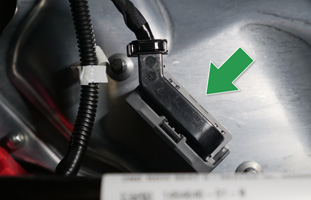
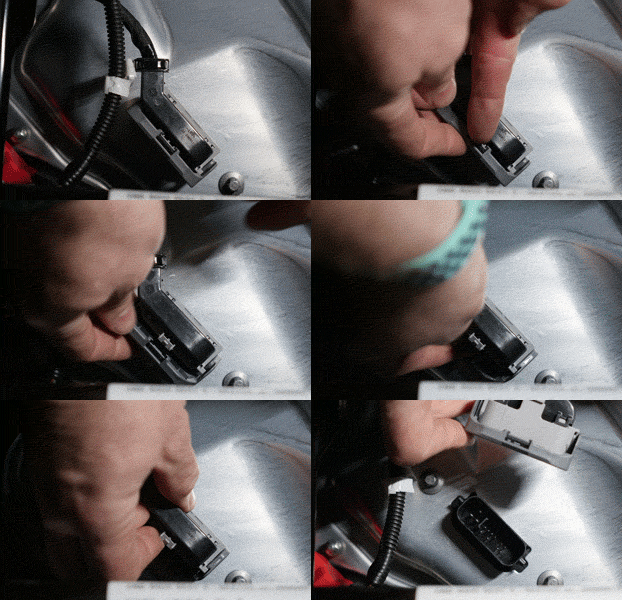
Disconnect HV: Unlock Grey/black header by pinching top and rotating locking arm downwards, then pull up to disconnect
Model Y: Located in Frunk on passenger side above wheel well (red/black connector near First Responder Loop w/ orange tag)
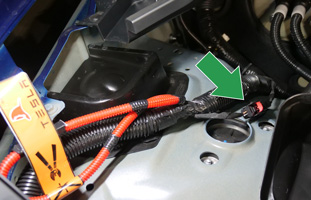
Disconnect HV: Slide red lock open, then squeeze end of plug while pulling apart to disconnect
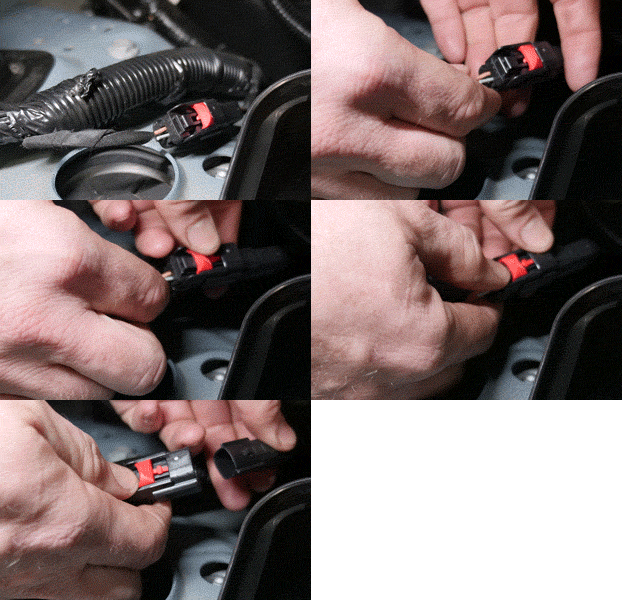
- [Situation-Dependent]: In the event that your 12V battery is dead, or if it has a total voltage below 13.0V, it will be necessary to manually recharge the 12V battery above 13.2V before proceeding. To do so, we recommend disconnecting the 12V battery from the vehicle (doesn't need to be removed from the vehicle, but can be) and connecting it to this battery charger or an equivalent 12V LiFePO4 battery charger until it's voltage is above 13.2V — this will take ~5 hours if charging from a dead battery state (i.e. 12.5V). The following (or any lead acid battery or trickle charger) would also work for EV batteries but may take much longer to charge (~24 hours) depending on amperage https://a.co/9EEPl6D
- Reconnect High Voltage (HV) using the reconnect method for your vehicle - see below:
Model 3: Reconnect Grey/black header by pushing firmly back into place and then rotate locking arm upwards into locked position
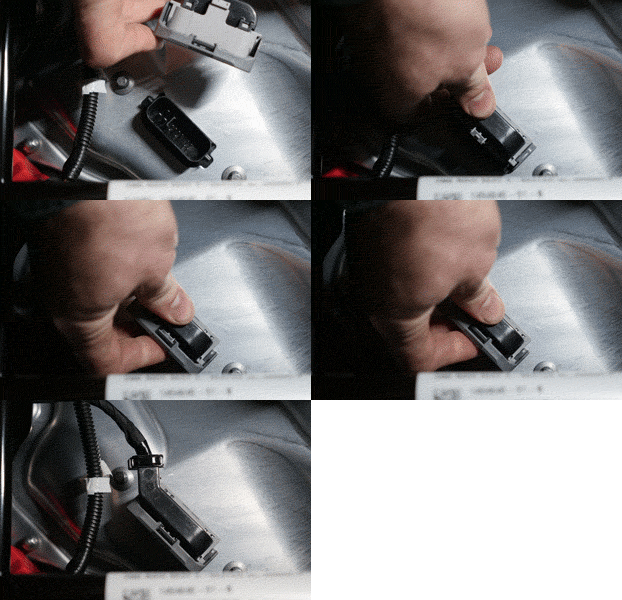
Model Y: Push together connectors and slide red lock into closed position

- Wait 10–20 seconds
- In the Ohmmu Energy App > Dashboard, turn on both the “Charging” and “Discharging” toggle switches, entering the default security code “999000” for both again. See below:

- After your vehicle reboots, the app should indicate that your vehicle is now recharging your 12V battery. This will confirm that your vehicle is now managing the 12V battery charge/discharge cycles again as it should.
- If any alerts remain on your Tesla's MCU screen, they should clear after driving the vehicle for a short period.
IMPORTANT: The “Charging” and “Discharging” toggle switches should be kept on at all times while the 12V battery is installed in your vehicle, except for temporary instances where you are performing a reset procedure such as this. Please note the “Charging” and “Discharging” toggle switches instruct the Battery Management System (BMS) to either ‘allow’ or 'block' charging and discharging of the battery, and should be used with caution.
For example, if you had “Charging” toggled off and “Discharging” toggled on, your battery wouldn't allow itself to be recharged, while still discharging energy to provide 12V power to your vehicle. These settings would cause the battery to eventually drain completely and no longer be able to power the vehicle's 12V systems (dead battery and vehicle). Please be mindful when toggling these switches in the app, as they may leave your battery in a state where it is blocking all charging or discharging energy and prevent it from functioning correctly in your vehicle.
As technical reference, when “Charging” is toggled on, the battery remains internally connected when a current of 0.0A or greater is present (positive current going into the battery), however when it is disabled, the BMS will react to any current greater than 0.0A and internally disconnect the battery to prevent it from charging its cells. Similarly, when “Discharging” is enabled, the BMS allows the battery to discharge energy to external current draws, however when it is disabled, the BMS will block the battery from discharging energy and won't provide any external power.
For Additional Support, Please Contact Us at:
Email: support@ohmmu.com
Our Commitment to You
Ohmmu is committed to our customers and the excellence of our products, and we apologize for any inconveniences you have experienced due to the recent Tesla software updates 2021.36.x and later.
Please know that we are continuing to evaluate this issue and working hard on further developing solutions that will prevent occurrences like this from happening in the future.
Thank you so much for your patience and support -- if you have any questions or require additional assistance, please contact: support@ohmmu.com
Tesla | Model S (Bluetooth-Enabled) | Reset Procedure via Ohmmu Energy App
(Est. Time to Complete: 5–10 mins)
Connect Ohmmu App to 12V Battery (Bluetooth-Enabled Versions Only)
- Download and install the Ohmmu Energy App from the App Store for iOS or Google Play for Android.
- Open Ohmmu Energy App and verify your 12V battery is connected. If not, open the device list and connect to your 12V battery.
- Your battery needs to be Bluetooth-enabled to connect with the Ohmmu Energy App. Look for the Bluetooth-enabled symbol on your battery or verify the model number on your order receipt ends with -B or -BH for compatibility.
- Follow the reset procedure below.
12V Battery Reset Procedure - 'Low Voltage Battery' Errors
- Make sure vehicle is parked and in a safe location to perform reset procedure.
- IMPORTANT: Roll driver's door window down and leave the door open for the ENTIRE PROCEDURE.
- Open frunk
- In the Ohmmu Energy App > Dashboard, turn off both the “Charging” and “Discharging” toggle switches, entering the default security code “999000” for both. See below:

- Disconnect the High Voltage (HV) system via First Responder Loop w/ orange tag, located in Frunk on passenger side above wheel well, using the disconnect method below:
Model S (All Versions: April 2016 – May 2021): https://youtu.be/zDi5to4WhA4?t=627
Model S (All Versions: 2015 – March 2016, and Dual Motor 2014+): https://youtu.be/tqx3kG0TAQs?t=236
Model S (All Single Motor Versions, 2012 – 2015): https://youtu.be/aYShHfOsNVk?t=230
- [Situation-Dependent]: In the event that your 12V battery is dead, or if it has an extremely low state of charge (SOC), it will be necessary to manually recharge the 12V battery above 13.2V before proceeding. To do so, we recommend disconnecting the 12V battery from the vehicle (doesn't need to be removed, but can be) and connecting it to this battery charger or an equivalent 12V LiFePO4 battery charger until it's voltage is above 13.2V — this will take ~5 hours if charging from a dead battery state (i.e. 12.5V).
- Reconnect First Responder Loop to re-engage High Voltage (HV) system.
- Wait 10–20 seconds
- In the Ohmmu Energy App > Dashboard, turn on both the “Charging” and “Discharging” toggle switches, entering the default security code “999000” for both again. See below:

- After your vehicle reboots, the app should indicate that your vehicle is now recharging your 12V battery. This will confirm that your vehicle is now managing the 12V battery charge/discharge cycles again as it should.
- If any alerts remain on your Tesla's MCU screen, they should clear after driving the vehicle for a short period.
IMPORTANT: The “Charging” and “Discharging” toggle switches should be kept on at all times while the 12V battery is installed in your vehicle, except for temporary instances where you are performing a reset procedure such as this. Please note the “Charging” and “Discharging” toggle switches instruct the Battery Management System (BMS) to either ‘allow’ or 'block' charging and discharging of the battery, and should be used with caution.
For example, if you had “Charging” toggled off and “Discharging” toggled on, your battery wouldn't allow itself to be recharged, while still discharging energy to provide 12V power to your vehicle. These settings would cause the battery to eventually drain completely and no longer be able to power the vehicle's 12V systems (dead battery and vehicle). Please be mindful when toggling these switches in the app, as they may leave your battery in a state where it is blocking all charging or discharging energy and prevent it from functioning correctly in your vehicle.
As technical reference, when “Charging” is toggled on, the battery remains internally connected when a current of 0.0A or greater is present (positive current going into the battery), however when it is disabled, the BMS will react to any current greater than 0.0A and internally disconnect the battery to prevent it from charging its cells. Similarly, when “Discharging” is enabled, the BMS allows the battery to discharge energy to external current draws, however when it is disabled, the BMS will block the battery from discharging energy and won't provide any external power.
For Additional Support, Please Contact Us at:
Email: support@ohmmu.com
Our Commitment to You
Ohmmu is committed to our customers and the excellence of our products, and we apologize for any inconveniences you have experienced due to the recent Tesla software updates 2021.36.x and later.
Please know that we are continuing to evaluate this issue and working hard on further developing solutions that will prevent occurrences like this from happening in the future.
Thank you so much for your patience and support -- if you have any questions or require additional assistance, please contact: support@ohmmu.com
Tesla | Model X (Bluetooth-Enabled) | Reset Procedure via Ohmmu Energy App
(Est. Time to Complete: 5–10 mins)
Connect Ohmmu App to 12V Battery (Bluetooth-Enabled Versions Only)
- Download and install the Ohmmu Energy App from the App Store for iOS or Google Play for Android.
- Open Ohmmu Energy App and verify your 12V battery is connected. If not, open the device list and connect to your 12V battery.
- Your battery needs to be Bluetooth-enabled to connect with the Ohmmu Energy App. Look for the Bluetooth-enabled symbol on your battery or verify the model number on your order receipt ends with -B or -BH for compatibility.
- Follow the reset procedure below.
12V Battery Reset Procedure - 'Low Voltage Battery' Errors
- Make sure vehicle is parked and in a safe location to perform reset procedure.
- IMPORTANT: Roll driver's door window down and leave the door open for the ENTIRE PROCEDURE.
- Open frunk
- In the Ohmmu Energy App > Dashboard, turn off both the “Charging” and “Discharging” toggle switches, entering the default security code “999000” for both. See below:

- Disconnect the High Voltage (HV) system via First Responder Loop w/ orange tag, located in Frunk on passenger side above wheel well, using the disconnect method below:
Model X (All Versions: 2016 – 2021): https://www.youtube.com/watch?v=ajl_XK7AoiU&t=573s
- [Situation-Dependent]: In the event that your 12V battery is dead, or if it has an extremely low state of charge (SOC), it will be necessary to manually recharge the 12V battery above 13.2V before proceeding. To do so, we recommend disconnecting the 12V battery from the vehicle (doesn't need to be removed, but can be) and connecting it to this battery charger or an equivalent 12V LiFePO4 battery charger until it's voltage is above 13.2V — this will take ~5 hours if charging from a dead battery state (i.e. 12.5V).
- Reconnect First Responder Loop to re-engage High Voltage (HV) system.
- Wait 10–20 seconds
- In the Ohmmu Energy App > Dashboard, turn on both the “Charging” and “Discharging” toggle switches, entering the default security code “999000” for both again. See below:

- After your vehicle reboots, the app should indicate that your vehicle is now recharging your 12V battery. This will confirm that your vehicle is now managing the 12V battery charge/discharge cycles again as it should.
- If any alerts remain on your Tesla's MCU screen, they should clear after driving the vehicle for a short period.
IMPORTANT: The “Charging” and “Discharging” toggle switches should be kept on at all times while the 12V battery is installed in your vehicle, except for temporary instances where you are performing a reset procedure such as this. Please note the “Charging” and “Discharging” toggle switches instruct the Battery Management System (BMS) to either ‘allow’ or 'block' charging and discharging of the battery, and should be used with caution.
For example, if you had “Charging” toggled off and “Discharging” toggled on, your battery wouldn't allow itself to be recharged, while still discharging energy to provide 12V power to your vehicle. These settings would cause the battery to eventually drain completely and no longer be able to power the vehicle's 12V systems (dead battery and vehicle). Please be mindful when toggling these switches in the app, as they may leave your battery in a state where it is blocking all charging or discharging energy and prevent it from functioning correctly in your vehicle.
As technical reference, when “Charging” is toggled on, the battery remains internally connected when a current of 0.0A or greater is present (positive current going into the battery), however when it is disabled, the BMS will react to any current greater than 0.0A and internally disconnect the battery to prevent it from charging its cells. Similarly, when “Discharging” is enabled, the BMS allows the battery to discharge energy to external current draws, however when it is disabled, the BMS will block the battery from discharging energy and won't provide any external power.
For Additional Support, Please Contact Us at:
Email: support@ohmmu.com
Our Commitment to You
Ohmmu is committed to our customers and the excellence of our products, and we apologize for any inconveniences you may have experienced due to the recent Tesla software updates.
Please know that we are continuing to evaluate this issue and working hard on further developing solutions that will prevent occurrences like this from happening in the future.
Thank you so much for your patience and support -- if you have any questions or require additional assistance, please contact: support@ohmmu.com
Tesla | All Models | Hard Reset Procedures
For our latest smart lithium batteries with bluetooth connectivity (SKUs ending in -B or -BH), you may perform a reset via our app:
- Tesla Model 3/Y: Reset Procedure via Ohmmu Energy App
- Tesla Model S: Reset Procedure via Ohmmu Energy App
- Tesla Model X: Reset Procedure via Ohmmu Energy App
Tesla Model S
- Open drivers door, roll down drivers window and open frunk
- “Power off” vehicle via MCU Safety & Security screen
- Disconnect First Responders Loop
- Disconnect 12V battery (leave installed, just disconnect the negative terminal) - need 10mm wrench for this.
- Wait 1-30 seconds max
- Reconnect First Responders Loop
- Reconnect 12V battery, then wait 2 minutes
- Step on brake pedal and wait for vehicle to reboot
Tesla Model 3
See Tesla | Model 3 / Y | "Schedule service to replace low voltage battery" Error
Tesla Model X
- Open drivers door, roll down drivers window and open frunk
- “Power off” vehicle via MCU Safety & Security screen
- Disconnect First Responders Loop — our installation video shows the process here: Disconnect First Responders Loop
- Disconnect 12V battery (leave installed, just disconnect the negative terminal) - need 10mm wrench for this.
- Wait 1-30 seconds max
- Reconnect First Responders Loop
- Reconnect 12V battery, then wait 2 minutes
- Step on brake pedal and wait for vehicle to reboot
Tesla Model Y
See Tesla | Model 3 / Y | "Schedule service to replace low voltage battery" Error
Tesla | Model X | "Unable to Drive: Voltage Supply Too Low" Alert
Problem:
I just replaced my battery and now vehicle says: “unable to drive: voltage supply too low”. After a few minutes of being on, but undriveable, the entire vehicle shuts back down. No clicking noise after reconnecting the 12V power.
Solution:
Your vehicle uses 12V to boot up all of the computers and prepare for power on, however in order to power on and drive the High Voltage battery contactors must engage. Since we aren’t hearing the clicking of contactors after connecting the 12V power on the vehicle we can determine that there is an issue with these contactors coming online. Since your vehicle is showing some signs of 12V power present (screen boot up, headlights flash, horn works, etc) we can be sure we have 12V power, but no High-Voltage power.
There are 2 potential reasons for this:
- Failure to resecure the High-Voltage disconnect (Model S and X: red loop that plugs in under hood, Model 3 and Y: grey header that plugs in under passenger side of rear seat). FIX: 1. disconnect 12V battery 2. secure the plug 3. Reconnect 12V battery
- Blown contactor fuse. FIX: Fuse F125 which is a 10A “micro2” fuse, check and replace fuse. Fuse can be purchased at any auto parts store.
If fuse was blown, likely reason is that the high-voltage plug wasn’t removed for the install process, please follow the procedures in our battery swap videos to avoid this.
Tesla | Model 3 / Y | "Schedule service to replace low voltage battery" Error
IMPORTANT: If you have a newer Bluetooth-enabled version of our battery, please refer to the following procedure instead: Tesla | Model 3 / Y (Bluetooth-Enabled) | Reset Procedure via Ohmmu Energy App
Support Notice Information
A potential issue has been identified for customers with Tesla Model 3 and Model Y vehicles, running software updates 2021.36.x and later.
Tesla has pushed several new features with their recent updates, which appear to alter the method and extent that the vehicle utilizes its 12V battery. Due to these changes, it is possible that you may receive error alerts for your 12V battery on your Model 3 or Model Y vehicle when it updates to these software versions.
IMPORTANT NOTES:
If you're experiencing error alerts, your battery is most likely healthy and your vehicle will continue to operate (some features may be turned off by Tesla software, such as USB ports and seat heaters).
However, if you receive this error alert and experience any other issues, please contact Ohmmu Support and we will walk you through a reset procedure or assess your situation and provide the necessary assistance.
To clear the error alerts and perform a software update (which may resolve these issues), please follow the RESET & SOFTWARE UPDATE PROCEDURE provided below.
RESET & SOFTWARE UPDATE PROCEDURE for Tesla Models 3/Y with Software Versions 2021.36.x and Later
Support Notice For:
Vehicles: Tesla Model 3, Model Y (Does not apply to other makes/models)
Software Versions: 2021.36.x and later
Reset & Update Procedure (Est. Time to Complete: 15 mins)
- If possible, drive your vehicle for ~10 mins prior to performing this procedure
- If a software update is available, confirm that it is staged for installation (12V alert does not affect this update from downloading to your vehicle)
- Unplug all USB devices in vehicle cabin
- IMPORTANT: Roll window down and leave the driver's door open for the ENTIRE PROCEDURE (Model 3: Also leave passenger side rear door open)
- Open Frunk
- On MCU (Tesla computer touchscreen in vehicle cabin), tap 'Power Off' under 'Safety and Security' menu and confirm
- Exit vehicle (be careful not to close driver's side door) and lift open Frunk
- Model 3 (All) and Model Y (2020 - Early 2021): Remove upper trim panel in Frunk by pulling up edges gently
- Model Y (Late 2021+ w/ HEPA Filter): Remove the 2x 10mm bolts securing the HEPA filter, remove filter assembly, and then remove upper trim panel in Frunk by pulling up edges gently. You can watch a video of this process here: Watch Video
- Locate (DO NOT disconnect yet) High Voltage (HV) disconnect method for your vehicle - see below:
Model 3: Located under passenger side rear seat (to access, slide seat lock tab toward center driver side to unlatch, then lift seat cushion up, remove black foam block, and locate grey plug underneath)
Model Y: Located in Frunk on passenger side above wheel well (red/black connector near First Responder Loop w/ orange tag)
- Using a 10mm wrench, loosen the negative terminal of the 12V battery (this is the terminal nearest the drivers side, without a red cover and no fuse attached)
- Remove negative terminal -- be careful not to drop lead spacer! Position the negative connector lug so that it doesn’t fall back onto the negative battery terminal.
- Disconnect HV
Model 3: Unlock Grey/black header by pinching top and rotating locking arm downwards, then pull up to disconnect
Model Y: Slide red lock open, then squeeze end of plug while pulling apart to disconnect
- [Situation-Dependent]: In the event that your 12V battery is dead, or if it has a low state of charge (SOC) below 13.0V, it will be necessary to manually recharge the 12V battery above 13.2V before proceeding. To do so, we recommend disconnecting the 12V battery from the vehicle (doesn't need to be removed from the vehicle, but can be) and connecting it to this battery charger or an equivalent 12V LiFePO4 battery charger until it's voltage is above 13.2V — this will take ~5 hours if charging from a dead battery state (i.e. 12.5V). The following lower cost option (or any lead acid battery or trickle charger) would also work for EV batteries but may take much longer to charge (~24 hours) depending on amperage https://a.co/9EEPl6D
- Reconnect HV
Model 3: Reconnect Grey/black header by pushing firmly back into place and then rotate locking arm upwards into locked position
Model Y: Push together connectors and slide red lock into closed position
- Wait 20 seconds (Don’t need to wait any longer than this)
- Reconnect negative terminal lug -- again, be careful not to drop the lead spacer!
- Tighten negative lug connector using 10mm wrench
- Model 3: replace foam block, then push rear seat down into position firmly, lift up to confirm it has latched
- Model Y (Late 2021+ w/ HEPA Filter): Reinstall HEPA filter using 2x 10mm bolts
- All Models: Secure top trim panel in frunk by placing into position then pressing along edges to snap together (will hear/feel snap)
- Wait for vehicle to reboot
- Disable sentry-mode under 'Safety and Security' menu
- Wait 1 hour (this gives 12V battery time to recharge before initiating update)
- Update software
For Additional Support, Please Contact Us at:
Email: support@ohmmu.com
Our Commitment to You
Ohmmu is committed to our customers and the excellence of our products, and we apologize for any inconveniences you have experienced due to the recent Tesla software updates 2021.36.x and later.
Please know that we are continuing to evaluate this issue and working hard on further developing solutions that will prevent occurrences like this from happening in the future.
Thank you so much for your patience and support -- if you have any questions or require additional assistance, please contact: support@ohmmu.com
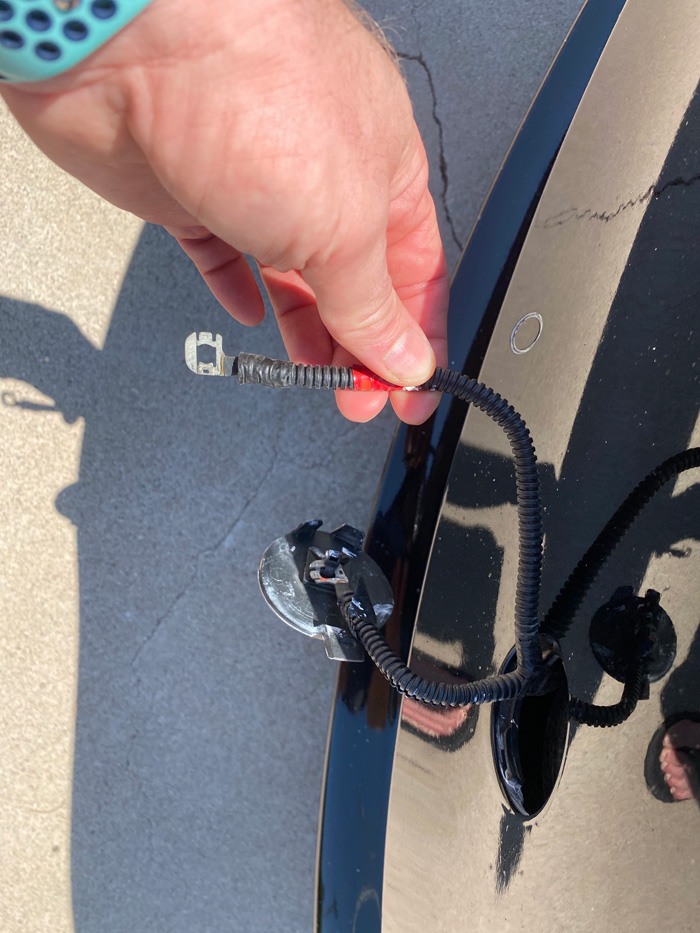
Tesla | Model 3 | Locked out of Vehicle - How to Gain Access to Frunk
Problem:
I'm totally locked out of my Tesla Model 3 - how do I get into the frunk to install my new battery?
Solution:
- Find the tow bar access point on the drivers side bumper.
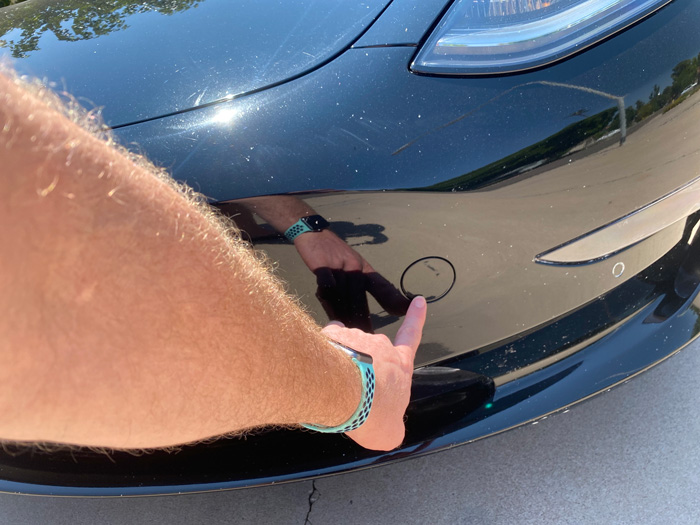
- Push upper right corner firmly until the bottom left corner flips outward.
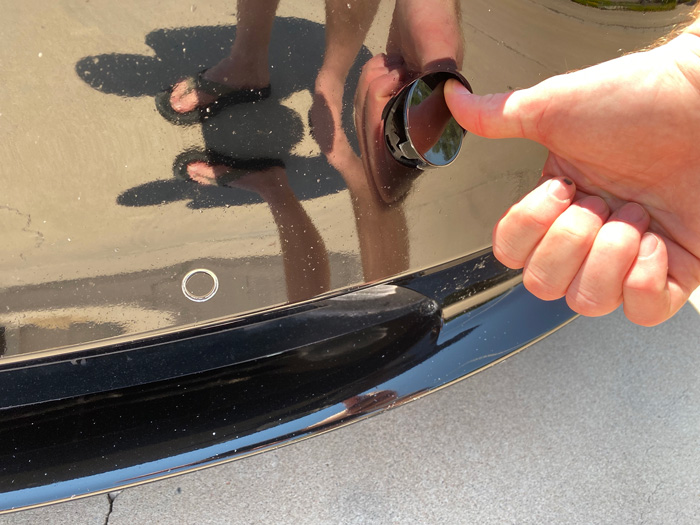
- Pull the cap forward to reveal 2 wires, one with a red tag on it and the other without a red tag. Apply voltage to the wires - you can use a 9V battery or your new 12V battery to do it. Red wire should go to positive terminal and the other wire to negative. Frunk will now pop open on its own.
Tesla | Model S (First Gen) | Battery Negative Lug Doesn't Fit
Problem:
Battery Negative lug doesn't seem to fit when battery installed.
Solution:
Remove Negative Terminal Adapter, then mount lug to adapter, then reinstall and rotate lug about 90 degrees from its original installed position.
Model X and Model S: "Schedule service to replace low voltage battery" – GTW_w174 Alert
If you get an alert to replace 12V battery in the Model S or Model X, you can find what the actual alert is by going to the 'Service' menu and then tapping on 'Notifications'. If the active alert is GTW_w174, please find more information below pertaining to that:
The GTW_w174 alert at this point doesn't appear to be related to any performance issues with our batteries and a simple reset has proven effective at clearing it and restoring normal operation*.
The GTW_w174 alert can be easily reset with the following procedure:
- Unplug USB devices
- In MCU go to service menu and tap 'wheel configuration', then change wheels to a different size and style
- Wait for reboot
- Repeat and change wheels back to actual size and style.
* You may also try a hard reset, or for bluetooth-enabled battery with Tesla Model X: Reset Procedure via Ohmmu Energy App or Tesla Model S: Reset Procedure via Ohmmu Energy App to clear the alert and allow the vehicle to charge the 12V again.
For our bluetooth-enabled battery, please confirm both Enable Charge and Enable Discharge toggles are in the on position via the Ohmmu app, Apple's XiaoXiangElectric app or Google Play's XiaoXiangElephant app.
In the event the battery is drained/dead, a jump pack (power supply/force/boost mode if available) or another vehicle can jump our batteries to wake it up.
We would recommend connecting battery to this battery charger for 5 hours (above 13.2V).
The following (or any lead acid battery or trickle charger) would also work for EV batteries but may take much longer to charge (~24 hours) depending on amperage https://a.co/9EEPl6D
Ohmmu App Support
How-to guides, support articles, and known issues
How To Use The Ohmmu Energy App
In this video, we explain what the Ohmmu Energy App is and how to utilize it with your Ohmmu lithium batteries.
Ohmmu Energy App Download
The Ohmmu Energy app is available from the App Store for iOS and Google Play for Android.


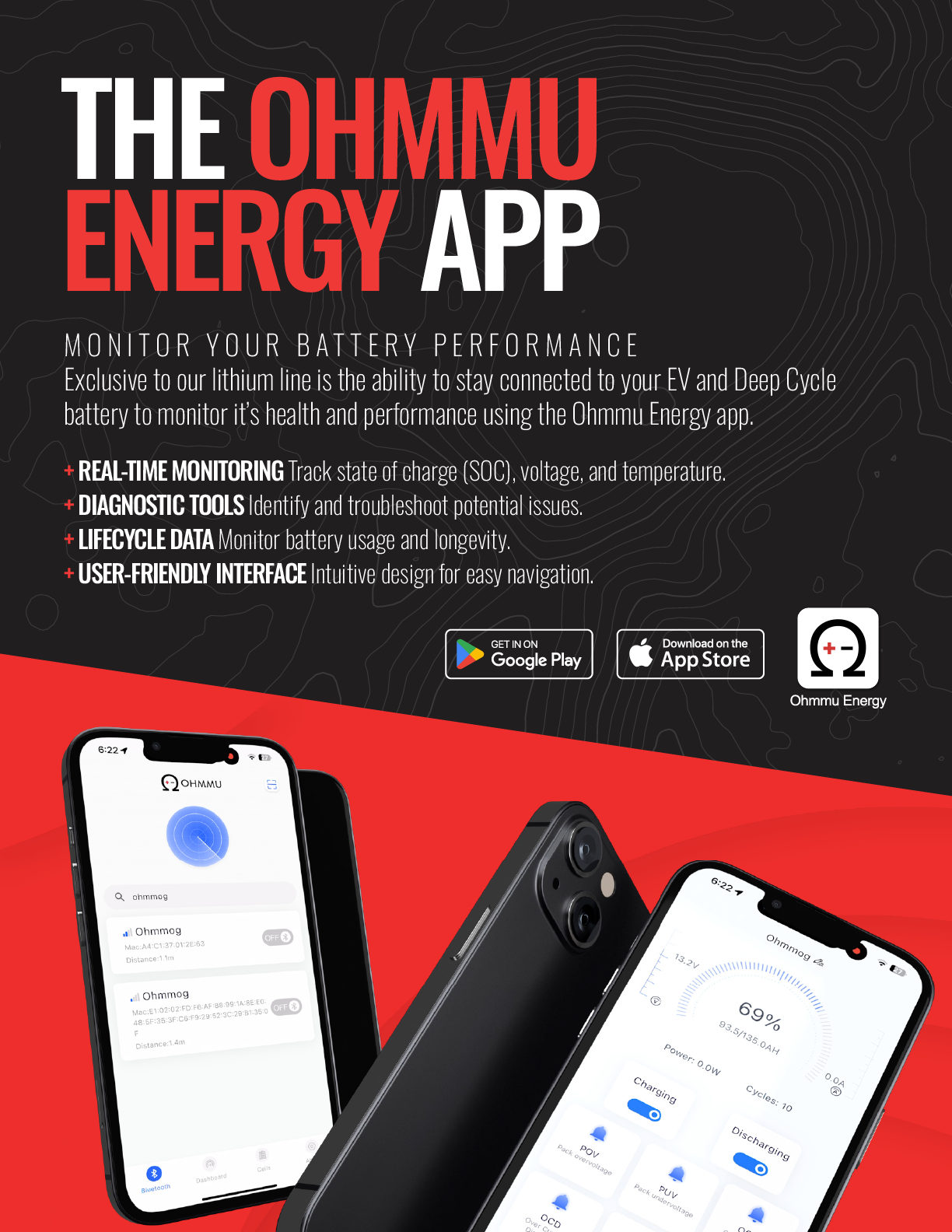
Please Note: Your 12V battery will only connect to one device, one app at a time. If your battery is not shown/bluetooth discoverable, please be sure to disconnect from a previous connection (close app, power down device). The battery will not connect to your device's bluetooth menu.
Enabling Bluetooth on the Ohmmu Energy App

Ohmmu and Ohmmu Energy Apps Cutoff
If our app seems 'cutoff' from the screen of your mobile device (i.e. the app doesn't seem to fit your screen, difficult to turn toggle on and off), please adjust your device's zoom/font/text size in the Accessibility menu on your device.
Ancel BM200 Battery Monitor | How to Install and Connect App
NOTE: This is a separate app from the Ohmmu Energy App with the intended use for batteries without Bluetooth functionality.
In this video we show you how to install the Ancel BM200 Battery Monitor on your Ohmmu Sodium 12V Batteries and how to use the Ancel BM200 App.
Download the Ancel App!
- Google Play: https://shorturl.at/BAylz
- Apple iOS: https://shorturl.at/6zGA7
Legal + Privacy Policies
Terms of use and privacy policies
Terms of Use
Last updated June 14, 2023
AGREEMENT TO TERMS
These Terms of Use constitute a legally binding agreement made between you, whether personally or on behalf of an entity (“you”) and Ohmmu LLC, doing business as Ohmmu and/or Ohmmu Energy ('Ohmmu', 'Ohmmu Energy', “we”, “us”, or “our”), concerning your access to and use of the ohmmu.com website as well as any other media form, media channel, mobile website or mobile application related, linked, or otherwise connected thereto (collectively, the “Site”). You agree that by accessing the Site, you have read, understood, and agreed to be bound by all of these Terms of Use. IF YOU DO NOT AGREE WITH ALL OF THESE TERMS OF USE, THEN YOU ARE EXPRESSLY PROHIBITED FROM USING THE SITE AND YOU MUST DISCONTINUE USE IMMEDIATELY.
Supplemental terms and conditions or documents that may be posted on the Site from time to time are hereby expressly incorporated herein by reference. We reserve the right, in our sole discretion, to make changes or modifications to these Terms of Use at any time and for any reason. We will alert you about any changes by updating the “Last updated” date of these Terms of Use, and you waive any right to receive specific notice of each such change. It is your responsibility to periodically review these Terms of Use to stay informed of updates. You will be subject to, and will be deemed to have been made aware of and to have accepted, the changes in any revised Terms of Use by your continued use of the Site after the date such revised Terms of Use are posted.
The information provided on the Site is not intended for distribution to or use by any person or entity in any jurisdiction or country where such distribution or use would be contrary to law or regulation or which would subject us to any registration requirement within such jurisdiction or country. Accordingly, those persons who choose to access the Site from other locations do so on their own initiative and are solely responsible for compliance with local laws, if and to the extent local laws are applicable.
The Site is not tailored to comply with industry-specific regulations (Health Insurance Portability and Accountability Act (HIPAA), Federal Information Security Management Act (FISMA), etc.), so if your interactions would be subjected to such laws, you may not use this Site. You may not use the Site in a way that would violate the Gramm-Leach-Bliley Act (GLBA).
The Site is intended for users who are at least 18 years old. Persons under the age of 18 are not permitted to use or register for the Site.
INTELLECTUAL PROPERTY RIGHTS
Unless otherwise indicated, the Site is our proprietary property and all source code, databases, functionality, software, website designs, audio, video, text, photographs, and graphics on the Site (collectively, the “Content”) and the trademarks, service marks, and logos contained therein (the “Marks”) are owned or controlled by us or licensed to us, and are protected by copyright and trademark laws and various other intellectual property rights and unfair competition laws of the United States, international copyright laws, and international conventions. The Content and the Marks are provided on the Site “AS IS” for your information and personal use only. Except as expressly provided in these Terms of Use, no part of the Site and no Content or Marks may be copied, reproduced, aggregated, republished, uploaded, posted, publicly displayed, encoded, translated, transmitted, distributed, sold, licensed, or otherwise exploited for any commercial purpose whatsoever, without our express prior written permission.
Provided that you are eligible to use the Site, you are granted a limited license to access and use the Site and to download or print a copy of any portion of the Content to which you have properly gained access solely for your personal, non-commercial use. We reserve all rights not expressly granted to you in and to the Site, the Content and the Marks.
USER REPRESENTATIONS
By using the Site, you represent and warrant that: (1) all registration information you submit will be true, accurate, current, and complete; (2) you will maintain the accuracy of such information and promptly update such registration information as necessary; (3) you have the legal capacity and you agree to comply with these Terms of Use; (4) you are not a minor in the jurisdiction in which you reside; (5) you will not access the Site through automated or non-human means, whether through a bot, script or otherwise; (6) you will not use the Site for any illegal or unauthorized purpose; and (7) your use of the Site will not violate any applicable law or regulation.
If you provide any information that is untrue, inaccurate, not current, or incomplete, we have the right to suspend or terminate your account and refuse any and all current or future use of the Site (or any portion thereof).
USER REGISTRATION
You may be required to register with the Site. You agree to keep your password confidential and will be responsible for all use of your account and password. We reserve the right to remove, reclaim, or change a username you select if we determine, in our sole discretion, that such username is inappropriate, obscene, or otherwise objectionable.
PRODUCTS
We make every effort to display as accurately as possible the colors, features, specifications, and details of the products available on the Site. However, we do not guarantee that the colors, features, specifications, and details of the products will be accurate, complete, reliable, current, or free of other errors, and your electronic display may not accurately reflect the actual colors and details of the products. All products are subject to availability, and we cannot guarantee that items will be in stock. We reserve the right to discontinue any products at any time for any reason. Prices for all products are subject to change.
PURCHASES AND PAYMENT
We accept the following forms of payment:
- Visa
- Mastercard
- American Express
- Discover
You agree to provide current, complete, and accurate purchase and account information for all purchases made via the Site. You further agree to promptly update account and payment information, including email address, payment method, and payment card expiration date, so that we can complete your transactions and contact you as needed. Sales tax will be added to the price of purchases as deemed required by us. We may change prices at any time. All payments shall be in U.S. dollars.
You agree to pay all charges at the prices then in effect for your purchases and any applicable shipping fees, and you authorize us to charge your chosen payment provider for any such amounts upon placing your order. We reserve the right to correct any errors or mistakes in pricing, even if we have already requested or received payment.
We reserve the right to refuse any order placed through the Site. We may, in our sole discretion, limit or cancel quantities purchased per person, per household, or per order. These restrictions may include orders placed by or under the same customer account, the same payment method, and/or orders that use the same billing or shipping address. We reserve the right to limit or prohibit orders that, in our sole judgment, appear to be placed by dealers, resellers, or distributors.
RETURN POLICY
Please review our Return Policy posted on the Site prior to making any purchases.
PROHIBITED ACTIVITIES
You may not access or use the Site for any purpose other than that for which we make the Site available. The Site may not be used in connection with any commercial endeavors except those that are specifically endorsed or approved by us.
As a user of the Site, you agree not to:
- Systematically retrieve data or other content from the Site to create or compile, directly or indirectly, a collection, compilation, database, or directory without written permission from us.
- Make any unauthorized use of the Site, including collecting usernames and/or email addresses of users by electronic or other means for the purpose of sending unsolicited email, or creating user accounts by automated means or under false pretenses.
- Use a buying agent or purchasing agent to make purchases on the Site.
- Use the Site to advertise or offer to sell goods and services.
- Circumvent, disable, or otherwise interfere with security-related features of the Site, including features that prevent or restrict the use or copying of any Content or enforce limitations on the use of the Site and/or the Content contained therein.
- Engage in unauthorized framing of or linking to the Site.
- Trick, defraud, or mislead us and other users, especially in any attempt to learn sensitive account information such as user passwords.
- Make improper use of our support services or submit false reports of abuse or misconduct.
- Engage in any automated use of the system, such as using scripts to send comments or messages, or using any data mining, robots, or similar data gathering and extraction tools.
- Interfere with, disrupt, or create an undue burden on the Site or the networks or services connected to the Site.
- Attempt to impersonate another user or person or use the username of another user.
- Sell or otherwise transfer your profile.
- Use any information obtained from the Site in order to harass, abuse, or harm another person.
- Use the Site as part of any effort to compete with us or otherwise use the Site and/or the Content for any revenue-generating endeavor or commercial enterprise.
- Decipher, decompile, disassemble, or reverse engineer any of the software comprising or in any way making up a part of the Site.
- Attempt to bypass any measures of the Site designed to prevent or restrict access to the Site, or any portion of the Site.
- Harass, annoy, intimidate, or threaten any of our employees or agents engaged in providing any portion of the Site to you.
- Delete the copyright or other proprietary rights notice from any Content.
- Copy or adapt the Site’s software, including but not limited to Flash, PHP, HTML, JavaScript, or other code.
- Upload or transmit (or attempt to upload or to transmit) viruses, Trojan horses, or other material, including excessive use of capital letters and spamming (continuous posting of repetitive text), that interferes with any party’s uninterrupted use and enjoyment of the Site or modifies, impairs, disrupts, alters, or interferes with the use, features, functions, operation, or maintenance of the Site.
- Upload or transmit (or attempt to upload or to transmit) any material that acts as a passive or active information collection or transmission mechanism, including without limitation, clear graphics interchange formats (“gifs”), 1×1 pixels, web bugs, cookies, or other similar devices (sometimes referred to as “spyware” or “passive collection mechanisms” or “pcms”).
- Except as may be the result of standard search engine or Internet browser usage, use, launch, develop, or distribute any automated system, including without limitation, any spider, robot, cheat utility, scraper, or offline reader that accesses the Site, or using or launching any unauthorized script or other software.
- Disparage, tarnish, or otherwise harm, in our opinion, us and/or the Site.
- Use the Site in a manner inconsistent with any applicable laws or regulations.
USER GENERATED CONTRIBUTIONS
The Site does not offer users to submit or post content. We may provide you with the opportunity to create, submit, post, display, transmit, perform, publish, distribute, or broadcast content and materials to us or on the Site, including but not limited to text, writings, video, audio, photographs, graphics, comments, suggestions, or personal information or other material (collectively, 'Contributions'). Contributions may be viewable by other users of the Site and through third-party websites. As such, any Contributions you transmit may be treated in accordance with the Site Privacy Policy. When you create or make available any Contributions, you thereby represent and warrant that:
- The creation, distribution, transmission, public display, or performance, and the accessing, downloading, or copying of your Contributions do not and will not infringe the proprietary rights, including but not limited to the copyright, patent, trademark, trade secret, or moral rights of any third party.
- You are the creator and owner of or have the necessary licenses, rights, consents, releases, and permissions to use and to authorize us, the Site, and other users of the Site to use your Contributions in any manner contemplated by the Site and these Terms of Use.
- You have the written consent, release, and/or permission of each and every identifiable individual person in your Contributions to use the name or likeness of each and every such identifiable individual person to enable inclusion and use of your Contributions in any manner contemplated by the Site and these Terms of Use.
- Your Contributions are not false, inaccurate, or misleading.
- Your Contributions are not unsolicited or unauthorized advertising, promotional materials, pyramid schemes, chain letters, spam, mass mailings, or other forms of solicitation.
- Your Contributions are not obscene, lewd, lascivious, filthy, violent, harassing, libelous, slanderous, or otherwise objectionable (as determined by us).
- Your Contributions do not ridicule, mock, disparage, intimidate, or abuse anyone.
- Your Contributions are not used to harass or threaten (in the legal sense of those terms) any other person and to promote violence against a specific person or class of people.
- Your Contributions do not violate any applicable law, regulation, or rule.
- Your Contributions do not violate the privacy or publicity rights of any third party.
- Your Contributions do not contain any material that solicits personal information from anyone under the age of 18 or exploits people under the age of 18 in a sexual or violent manner.
- Your Contributions do not violate any applicable law concerning child pornography, or otherwise intended to protect the health or well-being of minors;
- Your Contributions do not include any offensive comments that are connected to race, national origin, gender, sexual preference, or physical handicap.
- Your Contributions do not otherwise violate, or link to material that violates, any provision of these Terms of Use, or any applicable law or regulation.
Any use of the Site or the Marketplace Offerings in violation of the foregoing violates these Terms of Use and may result in, among other things, termination or suspension of your rights to use the Site and the Marketplace Offerings.
CONTRIBUTION LICENSE
You and Site agree that we may access, store, process, and use any information and personal data that you provide following the terms of the Privacy Policy and your choices (including settings).
By submitting suggestions or other feedback regarding the Site, you agree that we can use and share such feedback for any purpose without compensation to you.
We do not assert any ownership over your Contributions. You retain full ownership of all of your Contributions and any intellectual property rights or other proprietary rights associated with your Contributions. We are not liable for any statements or representations in your Contributions provided by you in any area on the Site. You are solely responsible for your Contributions to the Site and you expressly agree to exonerate us from any and all responsibility and to refrain from any legal action against us regarding your Contributions.
SUBMISSIONS
You acknowledge and agree that any questions, comments, suggestions, ideas, feedback, or other information regarding the Site or the Marketplace Offerings ('Submissions') provided by you to us are non-confidential and shall become our sole property. We shall own exclusive rights, including all intellectual property rights, and shall be entitled to the unrestricted use and dissemination of these Submissions for any lawful purpose, commercial or otherwise, without acknowledgment or compensation to you. You hereby waive all moral rights to any such Submissions, and you hereby warrant that any such Submissions are original with you or that you have the right to submit such Submissions. You agree there shall be no recourse against us for any alleged or actual infringement or misappropriation of any proprietary right in your Submissions.
THIRD-PARTY WEBSITES AND CONTENT
The Site may contain (or you may be sent via the Site or the Marketplace Offerings) links to other websites ('Third-Party Websites') as well as articles, photographs, text, graphics, pictures, designs, music, sound, video, information, applications, software, and other content or items belonging to or originating from third parties ('Third-Party Content'). Such Third-Party Websites and Third-Party Content are not investigated, monitored, or checked for accuracy, appropriateness, or completeness by us, and we are not responsible for any Third Party Websites accessed through the Site or any Third-Party Content posted on, available through, or installed from the Site, including the content, accuracy, offensiveness, opinions, reliability, privacy practices, or other policies of or contained in the Third-Party Websites or the Third-Party Content. Inclusion of, linking to, or permitting the use or installation of any Third-Party Websites or any Third-PartyContent does not imply approval or endorsement thereof by us. If you decide to leave the Site and access the Third-Party Websites or to use or install any Third-Party Content, you do so at your own risk, and you should be aware these Terms of Use no longer govern. You should review the applicable terms and policies, including privacy and data gathering practices, of any website to which you navigate from the Site or relating to any applications you use or install from the Site. Any purchases you make through Third-Party Websites will be through other websites and from other companies, and we take no responsibility whatsoever in relation to such purchases which are exclusively between you and the applicable third party. You agree and acknowledge that we do not endorse the products or services offered on Third-Party Websites and you shall hold us harmless from any harm caused by your purchase of such products or services. Additionally, you shall hold us harmless from any losses sustained by you or harm caused to you relating to or resulting in any way from any Third-Party Content or any contact with Third-Party Websites.
SITE MANAGEMENT
We reserve the right, but not the obligation, to: (1) monitor the Site for violations of these Terms of Use; (2) take appropriate legal action against anyone who, in our sole discretion, violates the law or these Terms of Use, including without limitation, reporting such user to law enforcement authorities; (3) in our sole discretion and without limitation, refuse, restrict access to, limit the availability of, or disable (to the extent technologically feasible) any of your Contributions or any portion thereof; (4) in our sole discretion and without limitation, notice, or liability, to remove from the Site or otherwise disable all files and content that are excessive in size or are in any way burdensome to our systems; and (5) otherwise manage the Site in a manner designed to protect our rights and property and to facilitate the proper functioning of the Site and the Marketplace Offerings.
PRIVACY POLICY
We care about data privacy and security. Please review our Privacy Policy. By using the Site or the Marketplace Offerings, you agree to be bound by our Privacy Policy, which is incorporated into these Terms of Use. Please be advised the Site and the Marketplace Offerings are hosted in the United States. If you access the Site or the Marketplace Offerings from any other region of the world with laws or other requirements governing personal data collection, use, or disclosure that differ from applicable laws in the United States, then through your continued use of the Site, you are transferring your data to the United States, and you expressly consent to have your data transferred to and processed in the United States.
TERM AND TERMINATION
These Terms of Use shall remain in full force and effect while you use the Site. WITHOUT LIMITING ANY OTHER PROVISION OF THESE TERMS OF USE, WE RESERVE THE RIGHT TO, IN OUR SOLE DISCRETION AND WITHOUT NOTICE OR LIABILITY, DENY ACCESS TO AND USE OF THE SITE AND THE MARKETPLACE OFFERINGS (INCLUDING BLOCKING CERTAIN IP ADDRESSES), TO ANY PERSON FOR ANY REASON OR FOR NO REASON, INCLUDING WITHOUT LIMITATION FOR BREACH OF ANY REPRESENTATION, WARRANTY, OR COVENANT CONTAINED IN THESE TERMS OF USE OR OF ANY APPLICABLE LAW OR REGULATION. WE MAY TERMINATE YOUR USE OR PARTICIPATION IN THE SITE AND THE MARKETPLACE OFFERINGS OR DELETE YOUR ACCOUNT AND ANY CONTENT OR INFORMATION THAT YOU POSTED AT ANY TIME, WITHOUT WARNING, IN OUR SOLE DISCRETION.
If we terminate or suspend your account for any reason, you are prohibited from registering and creating a new account under your name, a fake or borrowed name, or the name of any third party, even if you may be acting on behalf of the third party. In addition to terminating or suspending your account, we reserve the right to take appropriate legal action, including without limitation pursuing civil, criminal, and injunctive redress.
MODIFICATIONS AND INTERRUPTIONS
We reserve the right to change, modify, or remove the contents of the Site at any time or for any reason at our sole discretion without notice. However, we have no obligation to update any information on our Site. We also reserve the right to modify or discontinue all or part of the Marketplace Offerings without notice at any time. We will not be liable to you or any third party for any modification, price change, suspension, or discontinuance of the Site or the Marketplace Offerings.
We cannot guarantee the Site and the Marketplace Offerings will be available at all times. We may experience hardware, software, or other problems or need to perform maintenance related to the Site, resulting in interruptions, delays, or errors. We reserve the right to change, revise, update, suspend, discontinue, or otherwise modify the Site or the Marketplace Offerings at any time or for any reason without notice to you. You agree that we have no liability whatsoever for any loss, damage, or inconvenience caused by your inability to access or use the Site or the Marketplace Offerings during any downtime or discontinuance of the Site or the Marketplace Offerings. Nothing in these Terms of Use will be construed to obligate us to maintain and support the Site or the Marketplace Offerings or to supply any corrections, updates, or releases in connection therewith.
GOVERNING LAW
These Terms of Use and your use of the Site and the Marketplace Offerings are governed by and construed in accordance with the laws of the State of Arizona applicable to agreements made and to be entirely performed within the State of Arizona, without regard to its conflict of law principles.
DISPUTE RESOLUTION
Informal Negotiations
To expedite resolution and control the cost of any dispute, controversy, or claim related to these Terms of Use (each 'Dispute' and collectively, the “Disputes”) brought by either you or us (individually, a “Party” and collectively, the “Parties”), the Parties agree to first attempt to negotiate any Dispute (except those Disputes expressly provided below) informally for at least thirty (30) days before initiating arbitration. Such informal negotiations commence upon written notice from one Party to the other Party.
Binding Arbitration
If the Parties are unable to resolve a Dispute through informal negotiations, the Dispute (except those Disputes expressly excluded below) will be finally and exclusively resolved by binding arbitration. YOU UNDERSTAND THAT WITHOUT THIS PROVISION, YOU WOULD HAVE THE RIGHT TO SUE IN COURT AND HAVE A JURY TRIAL. The arbitration shall be commenced and conducted under the Commercial Arbitration Rules of the American Arbitration Association ('AAA') and, where appropriate, the AAA’s Supplementary Procedures for Consumer Related Disputes ('AAA Consumer Rules'), both of which are available at the AAA website www.adr.org. Your arbitration fees and your share of arbitrator compensation shall be governed by the AAA Consumer Rules and, where appropriate, limited by the AAA Consumer Rules. If such costs are determined by the arbitrator to be excessive, we will pay all arbitration fees and expenses. The arbitration may be conducted in person, through the submission of documents, by phone, or online. The arbitrator will make a decision in writing, but need not provide a statement of reasons unless requested by either Party. The arbitrator must follow applicable law, and any award may be challenged if the arbitrator fails to do so. Except where otherwise required by the applicable AAA rules or applicable law, the arbitration will take place in United States, Arizona. Except as otherwise provided herein, the Parties may litigate in court to compel arbitration, stay proceedings pending arbitration, or to confirm, modify, vacate, or enter judgment on the award entered by the arbitrator.
If for any reason, a Dispute proceeds in court rather than arbitration, the Dispute shall be commenced or prosecuted in the state and federal courts located in Maricopa, Arizona, and the Parties hereby consent to, and waive all defenses of lack of personal jurisdiction, and forum non conveniens with respect to venue and jurisdiction in such state and federal courts. Application of the United Nations Convention on Contracts for the International Sale of Goods and the Uniform Computer Information Transaction Act (UCITA) are excluded from these Terms of Use.
In no event shall any Dispute brought by either Party related in any way to the Site be commenced more than one (1) years after the cause of action arose. If this provision is found to be illegal or unenforceable, then neither Party will elect to arbitrate any Dispute falling within that portion of this provision found to be illegal or unenforceable and such Dispute shall be decided by a court of competent jurisdiction within the courts listed for jurisdiction above, and the Parties agree to submit to the personal jurisdiction of that court.
Restrictions
The Parties agree that any arbitration shall be limited to the Dispute between the Parties individually. The the full extent permitted by law, (a) no arbitration shall be joined with any other proceeding; (b) there is no right or authority for any Dispute to be arbitrated on a class-action basis or to utilize class action procedures; and (c) there is no right or authority for any Dispute to be brought in a purported representative capacity on behalf of the general public or any other persons.
Exceptions to Informal Negotiations and Arbitration
The Parties agree that the following Disputes are not subject to the above provisions concerning informal negotiations binding arbitration: (a) any Disputes seeking to enforce or protect, or concerning the validity of, any of the intellectual property rights of a Party; (b) any Dispute related to, or arising from, allegations of theft, piracy, invasion of privacy, or unauthorized use; and (c) any claim for injunctive relief. If this provision is found to be illegal or unenforceable, then neither Party will elect to arbitrate any Dispute falling within that portion of this provision found to be illegal or unenforceable and such Dispute shall be decided by a court of competent jurisdiction within the courts listed for jurisdiction above, and the Parties agree to submit to the personal jurisdiction of that court.
CORRECTIONS
There may be information on the Site that contains typographical errors, inaccuracies, or omissions that may relate to the Marketplace Offerings, including descriptions, pricing, availability, and various other information. We reserve the right to correct any errors, inaccuracies, or omissions and to change or update the information on the Site at any time, without prior notice.
DISCLAIMER
THE SITE IS PROVIDED ON AN AS-IS AND AS-AVAILABLE BASIS. YOU AGREE THAT YOUR USE OF THE SITE SERVICES WILL BE AT YOUR SOLE RISK. TO THE FULLEST EXTENT PERMITTED BY LAW, WE DISCLAIM ALL WARRANTIES, EXPRESS OR IMPLIED, IN CONNECTION WITH THE SITE AND YOUR USE THEREOF, INCLUDING, WITHOUT LIMITATION, THE IMPLIED WARRANTIES OF MERCHANTABILITY, FITNESS FOR A PARTICULAR PURPOSE, AND NON-INFRINGEMENT. WE MAKE NO WARRANTIES OR REPRESENTATIONS ABOUT THE ACCURACY OR COMPLETENESS OF THE SITE’S CONTENT OR THE CONTENT OF ANY WEBSITES LINKED TO THIS SITE AND WE WILL ASSUME NO LIABILITY OR RESPONSIBILITY FOR ANY (1) ERRORS, MISTAKES, OR INACCURACIES OF CONTENT AND MATERIALS, (2) PERSONAL INJURY OR PROPERTY DAMAGE, OF ANY NATURE WHATSOEVER, RESULTING FROM YOUR ACCESS TO AND USE OF THE SITE, (3) ANY UNAUTHORIZED ACCESS TO OR USE OF OUR SECURE SERVERS AND/OR ANY AND ALL PERSONAL INFORMATION AND/OR FINANCIAL INFORMATION STORED THEREIN, (4) ANY INTERRUPTION OR CESSATION OF TRANSMISSION TO OR FROM THE SITE, (5) ANY BUGS, VIRUSES, TROJAN HORSES, OR THE LIKE WHICH MAY BE TRANSMITTED TO OR THROUGH THE SITE BY ANY THIRD PARTY, AND/OR (6) ANY ERRORS OR OMISSIONS IN ANY CONTENT AND MATERIALS OR FOR ANY LOSS OR DAMAGE OF ANY KIND INCURRED AS A RESULT OF THE USE OF ANY CONTENT POSTED, TRANSMITTED, OR OTHERWISE MADE AVAILABLE VIA THE SITE. WE DO NOT WARRANT, ENDORSE, GUARANTEE, OR ASSUME RESPONSIBILITY FOR ANY PRODUCT OR SERVICE ADVERTISED OR OFFERED BY A THIRD PARTY THROUGH THE SITE, ANY HYPERLINKED WEBSITE, OR ANY WEBSITE OR MOBILE APPLICATION FEATURED IN ANY BANNER OR OTHER ADVERTISING, AND WE WILL NOT BE A PARTY TO OR IN ANY WAY BE RESPONSIBLE FOR MONITORING ANY TRANSACTION BETWEEN YOU AND ANY THIRD-PARTY PROVIDERS OF PRODUCTS OR SERVICES. AS WITH THE PURCHASE OF A PRODUCT OR SERVICE THROUGH ANY MEDIUM OR IN ANY ENVIRONMENT, YOU SHOULD USE YOUR BEST JUDGMENT AND EXERCISE CAUTION WHERE APPROPRIATE.
LIMITATIONS OF LIABILITY
IN NO EVENT WILL WE OR OUR DIRECTORS, EMPLOYEES, OR AGENTS BE LIABLE TO YOU OR ANY THIRD PARTY FOR ANY DIRECT, INDIRECT, CONSEQUENTIAL, EXEMPLARY, INCIDENTAL, SPECIAL, OR PUNITIVE DAMAGES, INCLUDING LOST PROFIT, LOST REVENUE, LOSS OF DATA, OR OTHER DAMAGES ARISING FROM YOUR USE OF THE SITE, EVEN IF WE HAVE BEEN ADVISED OF THE POSSIBILITY OF SUCH DAMAGES. NOTWITHSTANDING ANYTHING TO THE CONTRARY CONTAINED HEREIN, OUR LIABILITY TO YOU FOR ANY CAUSE WHATSOEVER AND REGARDLESS OF THE FORM OF THE ACTION, WILL AT ALL TIMES BE LIMITED TO THE AMOUNT PAID, IF ANY, BY YOU TO US DURING THE SIX (6) MONTH PERIOD PRIOR TO ANY CAUSE OF ACTION ARISING. CERTAIN US STATE LAWS AND INTERNATIONAL LAWS DO NOT ALLOW LIMITATIONS ON IMPLIED WARRANTIES OR THE EXCLUSION OR LIMITATION OF CERTAIN DAMAGES. IF THESE LAWS APPLY TO YOU, SOME OR ALL OF THE ABOVE DISCLAIMERS OR LIMITATIONS MAY NOT APPLY TO YOU, AND YOU MAY HAVE ADDITIONAL RIGHTS.
INDEMNIFICATION
You agree to defend, indemnify, and hold us harmless, including our subsidiaries, affiliates, and all of our respective officers, agents, partners, and employees, from and against any loss, damage, liability, claim, or demand, including reasonable attorneys’ fees and expenses, made by any third party due to or arising out of: (1) use of the Site; (2) breach of these Terms of Use; (3) any breach of your representations and warranties set forth in these Terms of Use; (4) your violation of the rights of a third party, including but not limited to intellectual property rights; or (5) any overt harmful act toward any other user of the Site with whom you connected via the Site. Notwithstanding the foregoing, we reserve the right, at your expense, to assume the exclusive defense and control of any matter for which you are required to indemnify us, and you agree to cooperate, at your expense, with our defense of such claims. We will use reasonable efforts to notify you of any such claim, action, or proceeding which is subject to this indemnification upon becoming aware of it.
USER DATA
We will maintain certain data that you transmit to the Site for the purpose of managing the performance of the Site, as well as data relating to your use of the Site. Although we perform regular routine backups of data, you are solely responsible for all data that you transmit or that relates to any activity you have undertaken using the Site. You agree that we shall have no liability to you for any loss or corruption of any such data, and you hereby waive any right of action against us arising from any such loss or corruption of such data.
ELECTRONIC COMMUNICATIONS, TRANSACTIONS, AND SIGNATURES
Visiting the Site, sending us emails, and completing online forms constitute electronic communications. You consent to receive electronic communications, and you agree that all agreements, notices, disclosures, and other communications we provide to you electronically, via email and on the Site, satisfy any legal requirement that such communication be in writing. YOU HEREBY AGREE TO THE USE OF ELECTRONIC SIGNATURES, CONTRACTS, ORDERS, AND OTHER RECORDS, AND TO ELECTRONIC DELIVERY OF NOTICES, POLICIES, AND RECORDS OF TRANSACTIONS INITIATED OR COMPLETED BY US OR VIA THE SITE. You hereby waive any rights or requirements under any statutes, regulations, rules, ordinances, or other laws in any jurisdiction which require an original signature or delivery or retention of non-electronic records, or to payments or the granting of credits by any means other than electronic means.
CALIFORNIA USERS AND RESIDENTS
If any complaint with us is not satisfactorily resolved, you can contact the Complaint Assistance Unit of the Division of Consumer Services of the California Department of Consumer Affairs in writing at 1625 North Market Blvd., Suite N 112, Sacramento, California 95834 or by telephone at (800) 952-5210 or (916) 445-1254.
MISCELLANEOUS
These Terms of Use and any policies or operating rules posted by us on the Site or in respect to the Site constitute the entire agreement and understanding between you and us. Our failure to exercise or enforce any right or provision of these Terms of Use shall not operate as a waiver of such right or provision. These Terms of Use operate to the fullest extent permissible by law. We may assign any or all of our rights and obligations to others at any time. We shall not be responsible or liable for any loss, damage, delay, or failure to act caused by any cause beyond our reasonable control. If any provision or part of a provision of these Terms of Use is determined to be unlawful, void, or unenforceable, that provision or part of the provision is deemed severable from these Terms of Use and does not affect the validity and enforceability of any remaining provisions. There is no joint venture, partnership, employment or agency relationship created between you and us as a result of these Terms of Use or use of the Site. You agree that these Terms of Use will not be construed against us by virtue of having drafted them. You hereby waive any and all defenses you may have based on the electronic form of these Terms of Use and the lack of signing by the parties hereto to execute these Terms of Use.
CONTACT US
In order to resolve a complaint regarding the Site or to receive further information regarding use of the Site, please contact us at:
Ohmmu 6169 S Morning Star Ln, Prescott, AZ 86303 United States contact@ohmmu.com
Privacy Policy
View the Ohmmu App Privacy Policy here: Ohmmu App Privacy Policy
Ohmmu LLC, doing business as Ohmmu, collects personal information for internal use. We do not share customer information with any third parties.
What type of information do you collect?
We receive, collect and store any information you enter on our website or provide us in any other way. In addition, we collect the Internet protocol (IP) address used to connect your computer to the Internet; login; e-mail address; password; computer and connection information and purchase history. We may use software tools to measure and collect session information, including page response times, length of visits to certain pages, page interaction information, and methods used to browse away from the page. We also collect personally identifiable information (including name, email, password, communications); payment details (including credit card information), comments, feedback, product reviews, recommendations, and personal profile.
How do you collect information?
When you conduct a transaction on our website, as part of the process, we collect personal information you give us such as your name, address and email address. Your personal information will be used for the specific reasons stated above only.
Why do you collect such personal information?
We collect such Non-personal and Personal Information for the following purposes:
- To provide and operate the Services;
- To provide our Users with ongoing customer assistance and technical support;
- To be able to contact our Visitors and Users with general or personalized service-related notices and promotional messages;
- To create aggregated statistical data and other aggregated and/or inferred Non-personal Information, which we or our business partners may use to provide and improve our respective services;
- To comply with any applicable laws and regulations.
How do you store, use, share and disclose your site visitors' personal information?
Our company is hosted on the Wix.com platform. Wix.com provides us with the online platform that allows us to sell our products and services to you. Your data may be stored through Wix.com’s data storage, databases and the general Wix.com applications. They store your data on secure servers behind a firewall.
All direct payment gateways offered by Wix.com and used by our company adhere to the standards set by PCI-DSS as managed by the PCI Security Standards Council, which is a joint effort of brands like Visa, MasterCard, American Express and Discover. PCI-DSS requirements help ensure the secure handling of credit card information by our store and its service providers.
How do you communicate with your site visitors?
We may contact you to notify you regarding your account, to troubleshoot problems with your account, to resolve a dispute, to collect fees or monies owed, to poll your opinions through surveys or questionnaires, to send updates about our company, or as otherwise necessary to contact you to enforce our User Agreement, applicable national laws, and any agreement we may have with you. For these purposes we may contact you via email, telephone, text messages, and postal mail.
How do you use cookies and other tracking tools?
Ohmmu uses cookies for important reasons, such as:
- To provide a great experience for your visitors and customers.
- To identify your registered members (users who registered to your site).
- To monitor and analyze the performance, operation and effectiveness of Wix's platform.
- To ensure our platform is secure and safe to use.
For more information about what cookies are and why they are used, please visit: https://www.allaboutcookies.org/
The following links explain how to access cookie settings in various browsers:
- Cookie settings in Firefox
- Cookie settings in Internet Explorer
- Cookie settings in Google Chrome
- Cookie settings in Safari (OS X)
- Cookie settings in Safari (iOS)
- Cookie settings in Android
To opt out of being tracked by Google Analytics across all websites, visit this link: http://tools.google.com/dlpage/gaoptout.
How can your site visitors withdraw their consent?
If you don’t want us to process your data anymore, please contact us at: contact@ohmmu.com.
Privacy policy updates
We reserve the right to modify this privacy policy at any time, so please review it frequently. Changes and clarifications will take effect immediately upon their posting on the website. If we make material changes to this policy, we will notify you here that it has been updated, so that you are aware of what information we collect, how we use it, and under what circumstances, if any, we use and/or disclose it.
Questions and your contact information
If you would like to: access, correct, amend or delete any personal information we have about you, you are invited to contact us at: contact@ohmmu.com.
Ohmmu App Privacy Policy
Last updated: June 14, 2023
This Privacy Policy describes Our policies and procedures on the collection, use and disclosure of Your information when You use the Service and tells You about Your privacy rights and how the law protects You.
We use Your Personal data to provide and improve the Service. By using the Service, You agree to the collection and use of information in accordance with this Privacy Policy.
Interpretation and Definitions
Interpretation
The words of which the initial letter is capitalized have meanings defined under the following conditions. The following definitions shall have the same meaning regardless of whether they appear in singular or in plural.
Definitions
For the purposes of this Privacy Policy:
- Account means a unique account created for You to access our Service or parts of our Service.
- Affiliate means an entity that controls, is controlled by or is under common control with a party, where 'control' means ownership of 50% or more of the shares, equity interest or other securities entitled to vote for election of directors or other managing authority.
- Application means the software program provided by the Company downloaded by You on any electronic device, named Ohmmu
- Company (referred to as either 'the Company', 'We', 'Us' or 'Our' in this Agreement) refers to Ohmmu LLC, 6169 S Morning Star Ln, Prescott, AZ 86303.
- Country refers to: Arizona, United States
- Device means any device that can access the Service such as a computer, a cellphone or a digital tablet.
- Personal Data is any information that relates to an identified or identifiable individual.
- Service refers to the Application.
- Service Provider means any natural or legal person who processes the data on behalf of the Company. It refers to third-party companies or individuals employed by the Company to facilitate the Service, to provide the Service on behalf of the Company, to perform services related to the Service or to assist the Company in analyzing how the Service is used.
- Usage Data refers to data collected automatically, either generated by the use of the Service or from the Service infrastructure itself (for example, the duration of a page visit).
- You means the individual accessing or using the Service, or the company, or other legal entity on behalf of which such individual is accessing or using the Service, as applicable.
Collecting and Using Your Personal Data
Types of Data Collected
Personal Data
While using Our Service, We may ask You to provide Us with certain personally identifiable information that can be used to contact or identify You. Personally identifiable information may include, but is not limited to:
- Email address
- Usage Data
Usage Data
Usage Data is collected automatically when using the Service.
Usage Data may include information such as Your Device's Internet Protocol address (e.g. IP address), browser type, browser version, the pages of our Service that You visit, the time and date of Your visit, the time spent on those pages, unique device identifiers and other diagnostic data.
When You access the Service by or through a mobile device, We may collect certain information automatically, including, but not limited to, the type of mobile device You use, Your mobile device unique ID, the IP address of Your mobile device, Your mobile operating system, the type of mobile Internet browser You use, unique device identifiers and other diagnostic data.
We may also collect information that Your browser sends whenever You visit our Service or when You access the Service by or through a mobile device.
Use of Your Personal Data
The Company may use Personal Data for the following purposes:
- To provide and maintain our Service, including to monitor the usage of our Service.
- To manage Your Account: to manage Your registration as a user of the Service. The Personal Data You provide can give You access to different functionalities of the Service that are available to You as a registered user.
- For the performance of a contract: the development, compliance and undertaking of the purchase contract for the products, items or services You have purchased or of any other contract with Us through the Service.
- To contact You: To contact You by email, telephone calls, SMS, or other equivalent forms of electronic communication, such as a mobile application's push notifications regarding updates or informative communications related to the functionalities, products or contracted services, including the security updates, when necessary or reasonable for their implementation.
- To provide You with news, special offers and general information about other goods, services and events which we offer that are similar to those that you have already purchased or enquired about unless You have opted not to receive such information.
- To manage Your requests: To attend and manage Your requests to Us.
- For business transfers: We may use Your information to evaluate or conduct a merger, divestiture, restructuring, reorganization, dissolution, or other sale or transfer of some or all of Our assets, whether as a going concern or as part of bankruptcy, liquidation, or similar proceeding, in which Personal Data held by Us about our Service users is among the assets transferred.
- For other purposes: We may use Your information for other purposes, such as data analysis, identifying usage trends, determining the effectiveness of our promotional campaigns and to evaluate and improve our Service, products, services, marketing and your experience.
We may share Your personal information in the following situations:
- With Service Providers: We may share Your personal information with Service Providers to monitor and analyze the use of our Service, to contact You.
- For business transfers: We may share or transfer Your personal information in connection with, or during negotiations of, any merger, sale of Company assets, financing, or acquisition of all or a portion of Our business to another company.
- With Affiliates: We may share Your information with Our affiliates, in which case we will require those affiliates to honor this Privacy Policy. Affiliates include Our parent company and any other subsidiaries, joint venture partners or other companies that We control or that are under common control with Us.
- With business partners: We may share Your information with Our business partners to offer You certain products, services or promotions.
- With other users: when You share personal information or otherwise interact in the public areas with other users, such information may be viewed by all users and may be publicly distributed outside.
- With Your consent: We may disclose Your personal information for any other purpose with Your consent.
Retention of Your Personal Data
The Company will retain Your Personal Data only for as long as is necessary for the purposes set out in this Privacy Policy. We will retain and use Your Personal Data to the extent necessary to comply with our legal obligations (for example, if we are required to retain your data to comply with applicable laws), resolve disputes, and enforce our legal agreements and policies.
The Company will also retain Usage Data for internal analysis purposes. Usage Data is generally retained for a shorter period of time, except when this data is used to strengthen the security or to improve the functionality of Our Service, or We are legally obligated to retain this data for longer time periods.
Transfer of Your Personal Data
Your information, including Personal Data, is processed at the Company's operating offices and in any other places where the parties involved in the processing are located. It means that this information may be transferred to — and maintained on — computers located outside of Your state, province, country or other governmental jurisdiction where the data protection laws may differ than those from Your jurisdiction.
Your consent to this Privacy Policy followed by Your submission of such information represents Your agreement to that transfer.
The Company will take all steps reasonably necessary to ensure that Your data is treated securely and in accordance with this Privacy Policy and no transfer of Your Personal Data will take place to an organization or a country unless there are adequate controls in place including the security of Your data and other personal information.
Disclosure of Your Personal Data
Business Transactions
If the Company is involved in a merger, acquisition or asset sale, Your Personal Data may be transferred. We will provide notice before Your Personal Data is transferred and becomes subject to a different Privacy Policy.
Law enforcement
Under certain circumstances, the Company may be required to disclose Your Personal Data if required to do so by law or in response to valid requests by public authorities (e.g. a court or a government agency).
Other legal requirements
The Company may disclose Your Personal Data in the good faith belief that such action is necessary to:
- Comply with a legal obligation
- Protect and defend the rights or property of the Company
- Prevent or investigate possible wrongdoing in connection with the Service
- Protect the personal safety of Users of the Service or the public
- Protect against legal liability
Security of Your Personal Data
The security of Your Personal Data is important to Us, but remember that no method of transmission over the Internet, or method of electronic storage is 100% secure. While We strive to use commercially acceptable means to protect Your Personal Data, We cannot guarantee its absolute security.
Children's Privacy
Our Service does not address anyone under the age of 13. We do not knowingly collect personally identifiable information from anyone under the age of 13. If You are a parent or guardian and You are aware that Your child has provided Us with Personal Data, please contact Us. If We become aware that We have collected Personal Data from anyone under the age of 13 without verification of parental consent, We take steps to remove that information from Our servers.
If We need to rely on consent as a legal basis for processing Your information and Your country requires consent from a parent, We may require Your parent's consent before We collect and use that information.
Links to Other Websites
Our Service may contain links to other websites that are not operated by Us. If You click on a third party link, You will be directed to that third party's site. We strongly advise You to review the Privacy Policy of every site You visit.
We have no control over and assume no responsibility for the content, privacy policies or practices of any third party sites or services.
Changes to this Privacy Policy
We may update Our Privacy Policy from time to time. We will notify You of any changes by posting the new Privacy Policy on this page.
We will let You know via email and/or a prominent notice on Our Service, prior to the change becoming effective and update the 'Last updated' date at the top of this Privacy Policy.
You are advised to review this Privacy Policy periodically for any changes. Changes to this Privacy Policy are effective when they are posted on this page.
Contact Us
If you have any questions about this Privacy Policy, You can contact us:
By email: contact@ohmmu.com